The school day has barely started, yet the administrator’s desk is already covered with paper forms...
A teacher needs lab equipment, another is requesting art supplies, and the principal is worried about the budget.

Each request means chasing approvals...
Sending emails to different suppliers and waiting for answers that might take days.
Nothing is centralized. Every step requires time, coordination, resources schools don’t have enough of.

In this daily reality, procurement feels less like supporting education and more like fighting bureaucracy.
And while classrooms are waiting for materials,
staff are left juggling paperwork instead of
focusing on what really matters:
students.

E-PROCUREMENT
SYSTEM
Empowering schools with efficient online procurement
Project Overview
This project focused on creating an e-procurement environment where school staff can move through complex purchasing tasks with clarity and ease. At its core, the design balances two priorities: a supportive, user-friendly experience for educators, and savings of time, effort, and resources for schools.
My Contributions
As the only designer, I led extensive user interviews and testing and testing, then translated insights into personas, flows, and prototypes. I designed the system’s foundation and delivered a roadmap that turned complex procurement needs into a user-centered solution.
What Problem Space Did We Own?
The Challenge
Replacing outdated procurement systems in education institutions for increased efficiency and cost savings
Educational institutions are currently using an outdated Ministry of Education system with limited capabilities, and its module complexity makes it difficult to use.
The inefficiency of purchasing processes in educational institutions results in higher costs, unstable supply chains, reduced funding for educational programs, and a waste of time for management and staff.
To facilitate the procurement process, including more efficient ways of finding suppliers, a procurement system is needed to manage tenders, contracts, and invoices.

Endless forms, manual chasing
Teachers and admins drown in paperwork, juggling approvals and supplier calls instead of focusing on classrooms.
=
Staff burnout, wasted time
No transparency on spending
Procurement is fragmented: rigid forms, no transparency, wasted budgets, and endless manual coordination.
=
Budget leaks and inefficiency
Fragmented communication
Delays, higher costs, and exhausted staff—leaving fewer resources and less energy for students.
=
Students wait for materials
The Process
How did you think through solving this?


Research
25 in-depth interviews with school staff, plus benchmarking of global procurement platforms to understand best practice
Define
Synthesized insights into personas and journey maps, clarifying pain points and opportunities across roles.
Design
Created flows, wireframes, and key concept screens to test problem–solution fit.
Validate
Ran concept testing with legacy-system users, refining screens to ensure clarity and alignment with real needs.

Research Objectives
Before designing, I needed to understand how schools currently approach procurement, what challenges they face, and what global practices could inspire a better solution
Users
Discover what users rely on in human facilitation - And what might be hard for them when switching to a digital tool.
Process
How procurement formally and really works in schools.
Regulations
The boundaries shaping the system.
Users Interviews
I interviewed 25 school staff, from principals to administrators, to uncover how procurement really feels on the ground. Beyond mapping pain points, these conversations revealed the deeper needs driving their work - clarity, trust, and efficiency - insights that would later define the system’s design.
Lack of Transparency & Tracking
"We often have delays in the procurement process because we need a system that provides real-time updates and tracks our orders."
No Standardized Procedures
"Without a set purchasing procedure, we're often left unsure how to approach transactions, resulting in a lot of back-and-forth."
Difficulty Finding Reliable Supplier
"We often struggle to find suppliers who can provide high-quality products at affordable prices."
Limited Bargaining Power
"We're not making the most of our budget because we lack the bargaining expertise and resources to find the best deals."
System Creates Bottlenecks, Not Clarity
"The system slows us down instead of clarifying request status. We end up managing things manually. It's faster, but full of risks and often out of compliance."
Need for Centralized Management
"Having everything in one place is essential, so that budget management, transaction management, and invoices management and the supplier work in harmony."
User Experience Map

Research Conclusions
Based on user research, competitive analysis and customer journey and persona....
Users Pain Points

1. Time As the Biggest Cost
Teachers and administrators spend excessive hours chasing approvals, collecting quotes, and processing invoices time stolen from their pedagogical role.
2. Educators forced into procurement roles
Staff feel unqualified and frustrated: “We’re not procurement officers.” Lack of training leaves them making decisions they don’t feel capable of, adding stress and mistakes.
3. Budgets lost to poor deals
Without time or skills to compare suppliers or negotiate, schools settle for higher prices and less favorable terms, eroding precious budgets.
4. Slow, manual processes
Checks, scattered invoices, and back-and-forth with municipal offices create long, cumbersome processes that slow down every transaction.
Users Needs
1. A simpler step-by-step process
Clear, standardized steps - supplier approval, price quotes, communication, payments - so staff can move confidently without getting lost in bureaucracy.
2. One place for everything
A centralized environment where budget, orders, suppliers, and communication live together, eliminating fragmented tools and duplicated effort.
3. Reliable suppliers, consistent quality
Trusted vendors vetted by the platform, ensuring schools don’t waste time or money on poor service or products.
4. Clear, real-time updates
Transparency at every step, so staff always know where each request stands without chasing emails or phone calls.
Competitive & Benchmark Learnings
What the Best Systems Do?
Framework alignment
quick “mini-competition” among approved vendors.
Centralization
one place for budget, quotes, comms, POs, invoices.
Transparency
status, SLAs, exception flags.
Supplier quality
ratings + compliance badges; easy switch to vetted vendors.
Design takeaway: adopt these as default rails, not optional extras.
Strategy Focus
Target Cutcome
Shift schools from ad-hoc purchasing to a guided, auditable e-procurement flow.
Value Levers
Time saved for staff, better deals (negotiation/benchmarking), fewer errors, full transparency.
Scope Constraints
Must work within Ministry frameworks, approved supplier pools, and public-sector compliance.
Who Decides What?
Decision Architecture
-
Principal (approver): Approvals, budget allocation, policy adherence → wants control, compliance, and time back.
-
Admin (doer): Day-to-day purchasing, quotes, order follow-up. → wants speed, clarity, fewer handoffs.
-
Finance/Municipality (auditor): Budget disbursement, framework contracts, compliance oversight. → wants clean artifacts, standardization, fewer exceptions.

Design implication: Separate request, approval, purchase, and reconciliation with clear permissions and audit trails.
Personas

Megan, the school administrator
Experience:
12 years of in the education system
Responsibility:
Receive purchase requirements from the school staff, supervise the entire purchase process, verify compliance with the budget and regulatory requirements
Megan's message
I'm responsible for ensuring the procurement process is efficient, compliant, and well-communicated to all stakeholders. But with so many other responsibilities on my plate, I need a tool that saves me time and streamlines the process.
Megan's goal
Megan's goals are to streamline procurement, ensure compliance with policies and regulations, maintain positive supplier relationships, and keep stakeholders informed and engaged.
Frustrations
-
Struggles with managing multiple tasks and ensuring timely completion
-
Feeling overwhelmed by the complicated and time-consuming procurement process
-
Excessive back-and-forth communication between parties involved in procurement,
-
Limited budget and resources for procurement
-
Slow approval times for procurement requests
Motivations
-
Wants to improve the procurement process to benefit the school and its students
-
Frees up more time for her to focus on what really matters: educating her students.
-
Values cost-effectiveness
-
Strives for compliance and transparency in procurement
-
Seeks recognition for successful procurement outcomes
Motivations
-
Wants to improve the procurement process to benefit the school and its students
-
frees up more time for her to focus on what really matters: educating her students.
-
Values cost-effectiveness
-
Strives for compliance and transparency in procurement
-
Seeks recognition for successful procurement outcomes

Sara, the School Principal
Experience:
25 years of in the education system
Responsibility:
Allocating sufficient budget and resources for procurement, and approving procurement requests and payments.
Sara's Message
Sara's Goal
Sara aims to reduce school procurement costs, increase savings, and ensure access to necessary resources for quality education. She wants an efficient and transparent procurement process to make informed decisions about resource allocation
Frustrations
-
Struggles with managing multiple tasks and ensuring timely completion
-
Feeling overwhelmed by the complicated and time-consuming procurement process
-
Excessive back-and-forth communication between parties involved in procurement,
-
Limited budget and resources for procurement
-
Slow approval times for procurement requests
"My priority is quality education for my students, but procurement can be a burden. I need a streamlined solution that saves me time and money, so I can focus on what matters most."
Adoption Risks
-
“Manual feels faster” → staff bypass the system.
-
“We’re not procurement officers” → low confidence to switch.
-
Fragmented comms → status confusion and duplicate work.
Adoption Risks
-
Speed to value: saved carts, vendor shortlists, reusable bundles, one-click reorders.
-
Guided steps: quote wizard, supplier comparison template, built-in “required docs” checklist.
-
Clarity: real-time status, SLA indicators, single thread per order (all messages/files in one place).
-
Confidence: “good-deal guardrails” (flag better prices, nudge to frameworks).
Wireframes
Administer Dashboard
The Administer Dashboard displays KPIs based on user research and priorities, highlighting what's at stake and requiring action.
KPIs – Quick Status
At-a-glance view of requests, approvals, tenders, and payments in progress

Spend Donut – Distribution
Understand total spend and how it breaks across categories.
Upcoming – Next Steps
Clear reminders of what’s due next, with direct links to act immediately
Spend Over Time – Trends
Visualize spending patterns across months, spot spikes, and anticipate needs.
Filters
Narrow down by project, category, supplier, or timeframe. Focus on what matters
Budget Bars – Track Usage
See how much of each budget line is spent vs. remaining, instantly.
Quick actions
add new vendors or purchase orders, and view contract and invoice status.
“No clear status updates” → Single dashboard with KPIs, timelines, and budget tracking for every order.
School staff Dashboard
One clear hub that makes procurement simple, transparent, and easy for staff of any tech skill level.

Requisition Status
All requests listed with live updates in a single view.
Recently Viewed Catalog
Quick access to school-approved products from the Ministry’s catalog, without re-searching every time.
Recent Suppliers
Return to trusted, Ministry-vetted suppliers quickly

"Too many steps, too much confusion” → The dashboard turns a messy procurement journey into a clear, step-by-step process, so staff know exactly what’s next.
Requisition Management
For school administrators, this screen centralizes procurement requests—tracking approvals, showing key stats, and surfacing recent activity to keep processes moving without delays.

Requisition List
All requests, statuses, and details in one clear table.
Recently Viewed Catalog
A snapshot of overall request status distribution.
Recently Viewed
Jump back to recent requisitions without re-searching.
Overtime Chart
Spot patterns in request volume over time.
Search & Filters
Narrow by requester, approver, or project
“Slow, manual processes” → No more chasing emails or waiting in the dark. Staff see exactly where each request stands and what action is required. Ensuring that requests are not delayed due to a lack of action.
RFQ Management
The RFQ (Request for Quotation) management streamlines procurement by facilitating communication between suppliers and the procurement team.
The screen includes key components identified through user research, such as a tracking table, a notification area for urgent or high-value requests, and a communication log.

Sourcing Management
While the RFQ screen facilitates communication between the school and the supplier during the quoting phase, the Sourcing Management screen manages the purchasing agreement once a supplier has been selected. This includes tracking the status of purchase orders, ensuring timely delivery of goods and services, and managing any issues that may arise during the procurement process.

RFQ Responses (Quotes) From Vendors
The RFQ Responses screen displays all price offers from suppliers for a specific RFQ. It includes important information such as the supplier's details, offer compliance, price, and the option to confirm, reject, or add the offer to the pool of comparison. By selecting an offer, more details become available, and the filter option helps streamline the process.

Supplier Cards
Vendor info, approval status, and past contracts at a glance.
Action Buttons
Approve, reject, or add to comparison with a single click.
Compliance Indicators
Quick match % to conditions so weak offers don’t waste time.
Proposal Details
Clear breakdown of items, quantities, delivery terms, and total cost.
“Paying more than we should” → Easy quote comparison and compliance flags ensure schools get the best value without requiring procurement expertise.
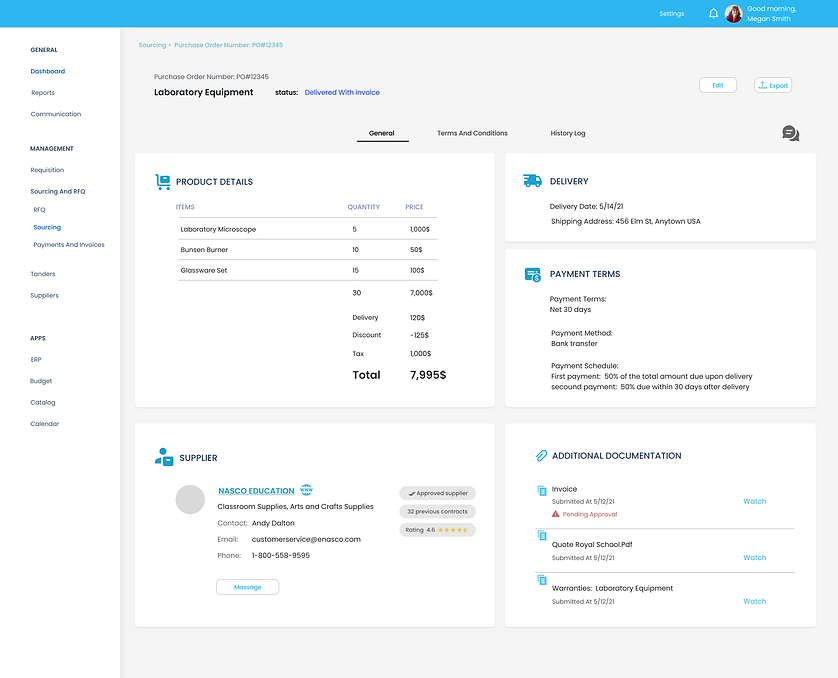
Purchase Order (Contract With A Vendor) View
The purchase order screen is where school administrators can view and manage their contracts with suppliers. The screen has three tabs: General, Terms and Conditions, and History Log
General View
Provides a summary of the contract details; Terms and Conditions


Summary of the process
1
Define Goals
Research scope & KPIs
3
Listen to Users
25 interviews with staff & admins
5
Journey Mapping
Current workflows & pain points
7
Design Solutions
Wireframes & prototypes created


2
Explore Context
Benchmark global platforms & regulations
4
Map Personas
Key roles & responsibilities
6
Synthesize Insights
Needs & opportunities defined
Curious about specific outcomes?
I deeply respect the privacy of the companies I work with, but I’d love to connect and share more.
I’d be happy to walk you through real examples of the impact, results, and decisions I helped shape.
Curious to dive deeper? I’d be happy to chat one-on-one.